
I had an MSP ask me this question recently, what is the best possible security with Microsoft 365 Business Premium? I had to think about my response for a minute. Microsoft 365 Business Premium provides multi-layered security and comes with a ton of enterprise-grade security features, so this blog article would be a mile long if we covered everything. So, I’ll use the dam leak analog (and no I’m not cussing at you). We want to plug up the biggest holes, aka security risks, in the dam first. The two security controls which plug the biggest security holes are: require phishing resistant multi-factor authentication (MFA) and require compliant devices.

The combination of these two security controls provides the highest security standard for the following reasons:
Eliminates phishing and credential theft: Passwordless methods, such as FIDO2 security keys and Windows Hello for Business, use cryptographic keys that cannot be phished or stolen, unlike traditional passwords or SMS text message codes.
Neutralizes “MFA fatigue” attacks: By removing passwords and relying on biometric or device-bound authentication, attackers cannot rely on tricking users into approving fraudulent push notifications.
Ensures device integrity: Requiring a compliant device in Microsoft Intune ensures that even if an attacker steals a user’s identity, they cannot log in from an unmanaged, infected, or non-compliant device.
Blocks stolen session tokens: If a user’s session token is stolen, a device compliance check can still block access because the attacker’s device does not meet the organizational security requirements.
Matches regulatory standards: This approach meets high-security standards, such as CIS benchmarks and CISA best practices, by combining phishing-resistant authentication with strict device health checks.
So, how do you implement these two security controls? For starters, you’ll need Microsoft 365 Business Premium licensing at a minimum. Microsoft 365 Business Premium includes Microsoft Entra ID plan 1, which provides conditional access, and Microsoft Intune, which provides device compliance.
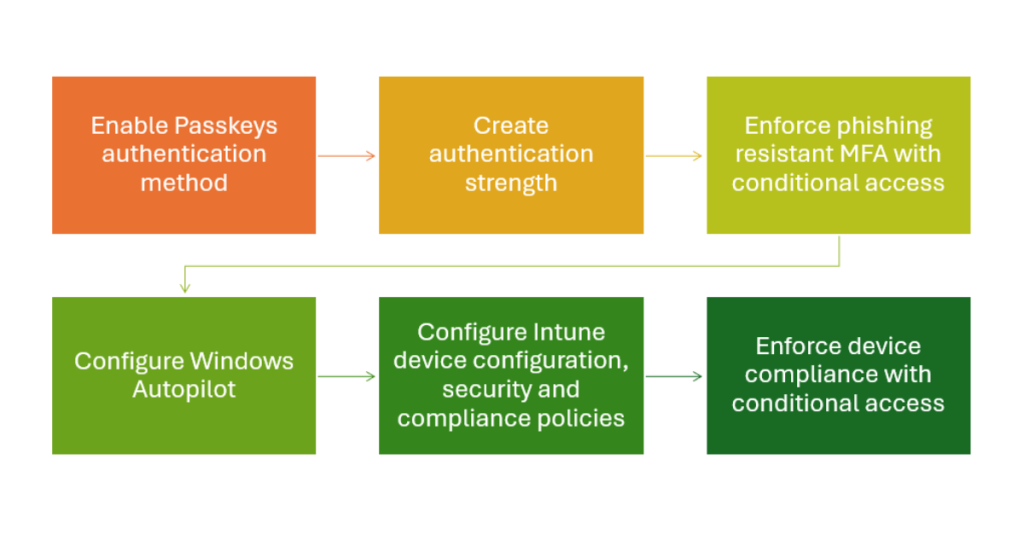
Implementing phishing resistant MFA involves enabling the passkeys (FIDO2) authentication method, creating a new authentication strength, and creating a conditional access policy in Microsoft Entra ID. I highly recommend creating a new authentication strength, so you have control over which authentication methods users can use. This allows you to include a temporary access pass (TAP) to allow for seamless and secure user onboarding of Microsoft Authenticator passkeys, Windows Hello for Business, and/or FIDO2 security keys.
Once you have phishing resistant MFA in place, you can tackle the require compliant devices security control. For sake of scope, let’s assume we are securing only Windows devices in this scenario. I would start by configuring Windows Autopilot for cloud-first device registration and enrollment. Windows Autopilot provides the quickest path to a Microsoft Entra-joined, Intune enrolled, and compliant Windows device.
NOTE: Please, please, do yourself a huge favor and DO NOT configure Windows Autopilot for hybrid-joined if you have on-premises Active Directory. If you want to know why, please feel free to book some time with me.
After Windows Autopilot is configured, you can move on to setting up your Intune device configuration, security and compliance policies. The Intune device configuration and security policies configure and enforce Windows device security settings. The Intune device compliance policy evaluates if your Windows device meets your security requirements and reports status of “compliant” or “non-compliant”. Then, the Intune device compliance status is used to determine if the device in question can access Microsoft 365 resources using Microsoft Entra conditional access. At this point, you could “block” all other device platforms with conditional access to close the gaps. There is a little more to the overall configuration, but hopefully you get the idea.
In summary, to achieve the highest security standard with Microsoft 365 Business Premium, you should prioritize “plugging the biggest holes” in the security dam first by combining phishing-resistant MFA with Intune device compliance. This powerful duo neutralizes credential theft and ensures that only healthy, managed devices can access corporate resources, effectively blocking advanced attacks like MFA fatigue and token theft.
